01 — Premise
Why replace a controller that worked
A stock ebike controller is a black box with a throttle input and a speed limit. You cannot see phase current, you cannot see FET temperature, you cannot change the ramp, and when it fails it fails silently. The stock display is worse: a battery bar with four segments and a number that is nominally miles per hour.
A VESC turns all of that into a documented, configurable, instrumented system. It runs field-oriented control instead of trapezoidal commutation, it reports every state variable I care about over CAN, and it lets me set the current limits from the actual ratings of the pack and the board rather than from whatever the factory decided.
The catch is that a VESC also lets you destroy the board and the motor in about four seconds if you commission it carelessly. Most of the work below is about not doing that.
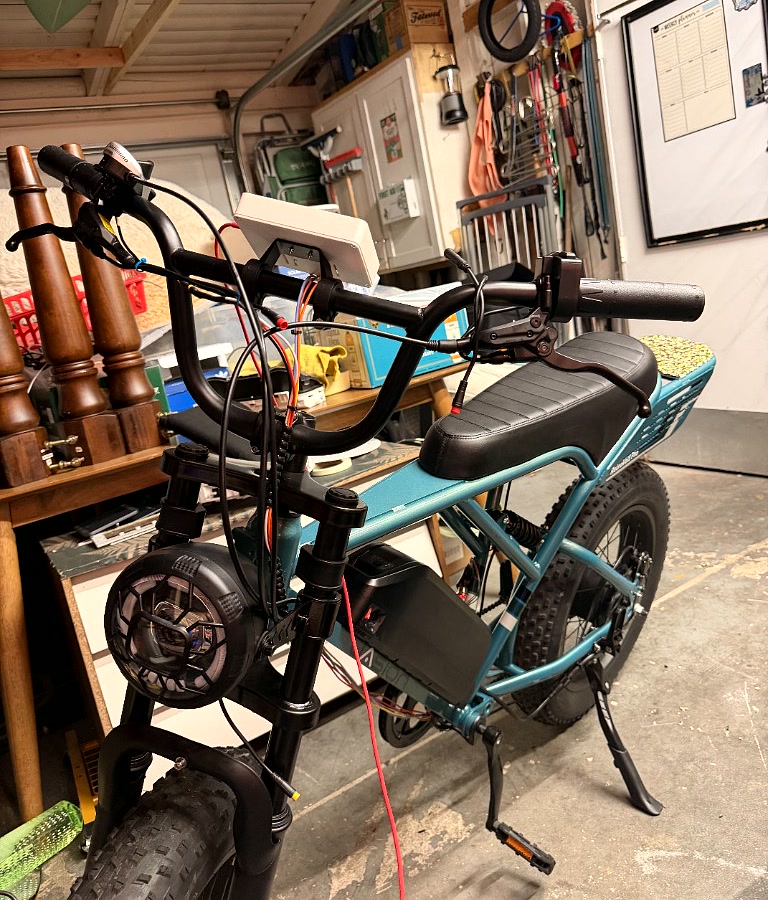
02 — Hardware
Three boxes and the wires between them
The whole system is a pack, a controller, and a display. Everything interesting happens at the boundaries.
| Part | Spec | Role |
|---|---|---|
| Jasion Retrovolt Pro | 14S Li-ion, 52 V nominal / 58.8 V full, 20 Ah, 20×4 fat tire | Donor bike and pack |
| Flipsky 75100 V2.0 | 14–84 V (4S–20S), 100 A cont. / 250 A peak, aluminium PCB | Motor controller |
| Rear hub motor | 46 poles (23 pole pairs), hall sensored, 2000 W advertised peak | Drive |
| Waveshare ESP32-S3-Touch-LCD-4.3B | 4.3″ 800×480 IPS, GT911 touch, 16 MB flash / 8 MB PSRAM, onboard CAN transceiver | Handlebar dashboard |
The display board is the right board for this
Most ESP32 dev boards would need an external CAN transceiver bolted on. This one has a transceiver, a 16-position screw terminal that exposes CAN-H and CAN-L directly, a 120 Ω termination switch on the back, and a 7–36 V input — so it takes bike power through a buck converter without another regulator board in the loop.
Verified GPIO map
| Function | Pins |
|---|---|
| CAN (TWAI) | TX GPIO15, RX GPIO16 → onboard transceiver |
| I²C bus | SDA GPIO8, SCL GPIO9 — touch, CH422G expander, terminal pins |
| GT911 touch | I²C 0x5D (or 0x14), INT on GPIO4 |
| CH422G expander | IO1 = touch reset, IO2 = backlight, IO3 = LCD reset |
| RGB panel clock | 16 MHz, pclk_active_neg = 1 |
The display's VIN terminal is 36 V absolute maximum. The pack is 58.8 V at full charge. Pack voltage never touches VIN — it goes through a fused DC-DC buck to 5 V first. Getting this backwards destroys the board instantly.

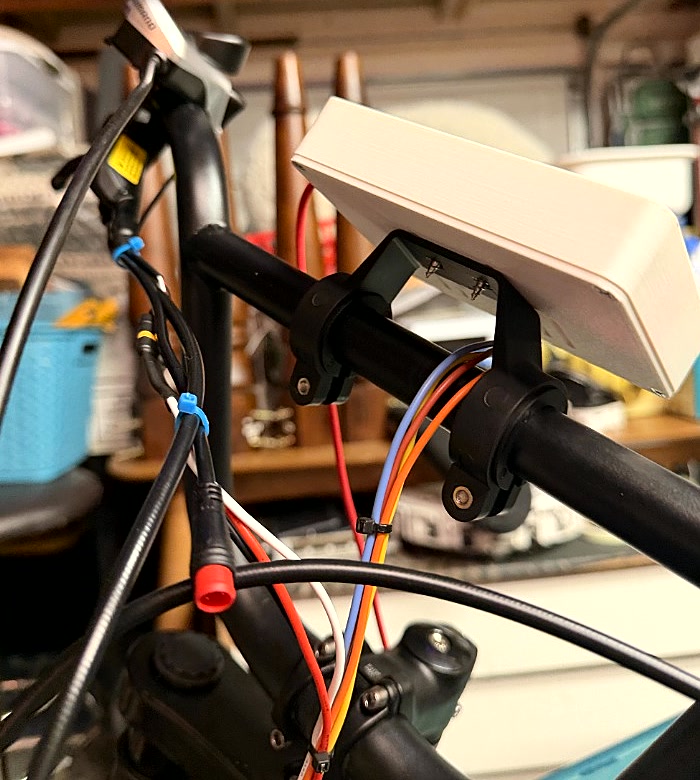
03 — High current
Phase and hall terminations
The replacement controller arrived with a different connector scheme than the motor's harness, which means the three phase leads have to be joined somewhere. At 100 A continuous this is the single most consequential mechanical joint on the bike — a bad phase connection does not fail gracefully, it arcs, heats, and eventually welds or opens under load.
A printed block instead of a bundle of heat shrink
Rather than butt-splice and hope, I designed a parametric 3-post terminal block in OpenSCAD and printed it. It joins each controller phase to its motor phase with crimped M5 ring terminals on a shared stud, inside a shell that makes a phase-to-phase short physically difficult.
- 22 mm post pitch — clears M5 ring terminals of roughly 15 mm outer diameter with real margin at 100 A+.
- Captured hex pocket under each post, so the bolt cannot spin while the nut is torqued from above. Bolts drop in from below before assembly.
- Six 12 mm open-top wire entries cut fully through both long walls, so flexible 12 AWG and its lug necks enter without a sharp bend.
- Full-height divider walls between phases, so a loose lug or a dropped tool cannot bridge two of them.
- Snap-on lid closing the entire live area while keeping the joints serviceable.
PETG or nylon, not PLA. This sits near a hot motor and a hot controller. PLA softens well below the temperatures this part will see in a summer hill climb.
The printed part is an insulator and a strain relief. The metal lug-to-lug joint carries the current — the plastic is not structural to the electrical path. Do not solder-only terminate high-current phase leads; crimp them properly with a tool matched to the lug.
Hardware per block
- 3 × M5 × 16 mm hex-head bolts
- 3 × M5 all-metal lock nuts, kept within their temperature rating
- 6 × copper ring terminals, 5 mm stud hole, crimped to the real wire gauge
Hall sensors
The motor is hall-sensored, which is what makes smooth starts from zero possible without sensorless startup tricks. The controller's HALL port carries 5 V, a temperature line, three hall signals, and ground. Those run back to the motor's sensor connector unmodified — the hall harness is low current and the factory connector is fine.
The temperature pin is the interesting one: the controller can read a motor thermistor through it, but only if you know which thermistor type the motor actually uses. I have not confirmed that, so motor temperature sensing stays disabled rather than configured with a guess.


04 — The link
Two nodes, one bus, three wires
The display is a passive telemetry node. It listens; it does
not command the motor. That distinction matters both for safety and for
configuration — a setting like Multiple VESCs Over CAN
assumes any other CAN node is a second drive controller, which would
mean throttle commands get repeated to the display. It is not, so that
setting is off.
Three rules that are not optional
- Share a ground. CAN is differential but it is not magic — without a common reference between the controller and the display, the bus floats and you get nothing, or worse, intermittent garbage.
- Twist CAN-H and CAN-L, a few twists per inch. This is a bike with three unshielded phase wires switching tens of amps a few centimetres away. The twist is what makes the differential pair reject that.
- Terminate both ends at 120 Ω. Two nodes, two terminators. The display has a switch on the back for this.
What the display decodes
VESC status frames are extended-ID CAN, with the command in the upper
byte of the identifier (cmd = ID >> 8). Enabling
status messages 1 through 5 at 20–50 Hz in VESC Tool gives the dashboard
everything it renders:
| Cmd | Frame | Fields used |
|---|---|---|
9 | STATUS | ERPM (int32), motor current ×10, duty ×1000 |
14 | STATUS_2 | Amp-hours ×1e4 |
15 | STATUS_3 | Watt-hours ×1e4 |
16 | STATUS_4 | FET temp ×10, motor temp ×10, input current ×10 |
27 | STATUS_5 | Tachometer (int32), input voltage ×10 |
Speed is not on the bus. The controller reports electrical RPM, and turning that into miles per hour needs the motor pole count, the gear ratio, and the wheel circumference — which is why those live in the display's own settings page rather than being hardcoded.

05 — Tuning
Commissioning without cooking it
Everything in this section is what I did on my bike, with my pack, controller and motor. Current limits are not transferable between builds. Back up both configurations, lift the driven wheel for the first spin, commission at conservative values, and change one group at a time.
The phase-filter trap
This is the failure mode that kills these boards, and it is worth understanding before you plug anything in.
Flipsky's 75-series firmware from 5.03 onward has a
Enable Phase Filters option. The Pro
variant has phase-filter hardware. The non-Pro variant
does not. If the option is set true on a board without the hardware and
the motor spins, the board can be destroyed. Worse, the motor detection
wizard offers to load default parameters — and answering yes
re-enables the filter after you have carefully turned it off.
-
Identify which board you actually have
Pro and non-Pro both report the
75_300_R2firmware hardware target, so the firmware label tells you nothing. Go by the product listing and the physical board. Mine is documented as the non-Pro 75100 V2.0. -
Set phase filters false, and write it
Motor Settings → FOC → Filters. Set
Enable Phase Filters = Falseand write the motor configuration before running detection. Not after. -
Say no to "Load Default Parameters"
During the wizard, when it offers to reload defaults, answer no. This is the step that undoes step 2 and cooks the board.
-
Run detection with the wheel off the ground
FOC detection spins the motor. Do it on a stand, with nothing in the way, and with a hand on the disconnect.
The shipped configuration was wrong in six places
After capturing 24 screenshots of the controller's as-delivered state, six settings were not "untuned" but actively incorrect for this hardware:
| Setting | As shipped | Corrected to | Why |
|---|---|---|---|
| Enable Phase Filters | True |
False |
No phase-filter hardware on the non-Pro board |
| Regen voltage cutoff | 1000 / 1100 V | 57.4 / 58.8 V | 4.10 and 4.20 V per cell × 14S. The shipped values disable the taper entirely |
| Max ERPM | ±100,000 | 30,000 to start | At 46 poles, 2.769:1 and a 508 mm wheel, 100,000 ERPM is about 93 mph. Not a bike limit |
| ADC input mode | Current No Reverse Brake Center | Current No Reverse Brake ADC2 | Throttle on ADC1 and brake on ADC2 are separate inputs, not one centred bidirectional one |
| Multiple VESCs Over CAN | True |
False |
The display is a passive telemetry node, not a second drive controller |
| BMS Type | VESC BMS |
None |
The stock pack's BMS is not a VESC CAN BMS. Voltage and current limits stay active either way |
Staged current limits, with a gate on each stage
Motor current is phase current and mostly controls low-speed torque. Battery current controls pack draw and roughly sets electrical power. They are not interchangeable, and the shipped values exceeded both the controller rating and the pack's label.
| Parameter | Shipped | Stage 1 | Stage 2 | Gate before stage 2 |
|---|---|---|---|---|
| Motor current max | 199.27 A | 60 A | 90 A | Clean starts, no faults, phase joints stay cool |
| Motor current max brake | −199.27 A | −40 A | −60 A | Rear wheel does not lock; mechanical braking stays predictable |
| Absolute max current | 298.91 A | 150 A | 180 A | No unexplained ABS_OVER_CURRENT; never past the 250 A rating |
| Battery current max | 35 A | 30 A | 30 A | Hard ceiling — the pack label says 30 A max discharge |
| Battery regen max | −10 A | −5 A | −5 A | Only raise after the BMS charge limit is confirmed |
The stage-2 motor current target deliberately leaves margin below the controller's 100 A continuous rating. The pack stays at its labelled 30 A ceiling — about 1.55 kW at nominal, 1.76 kW at full charge — because launch feel comes from phase current and throttle mapping, not from overloading the cells.
Regen stays low and mechanical brakes stay primary. Near full charge the regen taper reduces braking force exactly when the pack cannot absorb more, so a bike that relies on regen to stop is a bike that does not stop at the top of a hill.

06 — Firmware & UI
The display firmware and cockpit architecture
PlatformIO, Arduino framework, LVGL 8/9 for the interface, and ESP-IDF's TWAI
driver for CAN. The board runs a qio_opi flash and PSRAM
configuration, which the 800×480 RGB panel needs for its double-buffered
frame buffer and vector map runways.
Production screens (800×480) & layout hierarchy
The UI is designed around fixed 800×480 production roots with strict touch ergonomics (minimum 46 px interactive touch targets):
-
Full-Map Drive Cockpit (
Drive · Night/Drive · Day): The full canvas is occupied by a vector map runway backed by PSRAM with smooth GPS auto-follow, heading rotation, manual pan, recenter, and optical zoom steps (75%, 100%, 125%, 150%). Status pill, large digital speed, estimated range, ODO, trip meter, power gauge, and zoom controls float neatly along the borders. -
Thumb Rail (Right 76 px):
The right 76 px is reserved as a thumb-friendly navigation and ride-mode selector
(
Eco,Normal,Sport) reachable while keeping a hand near the grip. -
Live Data & Settings (
Live Data · Night/Settings · Day): Uses a 724×54 px top rail (status pills, clock, battery %) paired with a 724×426 px content canvas containing real-time telemetry tiles (FET temp, phase amps, pack volts, watt-hours) and persistent NVS settings.
| Component | Variants | Runtime Contract |
|---|---|---|
| Status Pill | Live, Searching, Offline | CAN heartbeat & GPS lock state |
| Mode Button | Eco, Normal, Sport | VESC current profile ramp switching |
| Telemetry Tile | Compact & Wide | Data-driven label, live value, unit |
| Gauge | Speed, Power, Battery | Interpolated needle/arc with peak holds |
| Navigation Item | Selected & Default | Drive, Live Telemetry, Trip Log, Config |
Interactive Tool: You can inspect, modify, and test this dashboard layout in the ESPboards LVGL Designer Canvas → with live gradient arcs, animated VESC throttle simulation, and battery sliders.
Built in stages, each one provable
-
Stage 1 · Panel
Get the RGB panel and its timings right in isolation. Nothing else works until pixels do.
-
Stage 2 · Cluster
LVGL gauge layout driven by fake data, so the interface can be designed without the bike present.
-
Stage 3 · Telemetry
Real VESC CAN frames decoded and bound to the gauges. This is where the fake data gets deleted.
-
Stage 4 · Settings
Touch input, NVS calibration, and persistent odometer/trip storage.
Configuration on the screen, not in a rebuild
Wheel diameter, pole pairs, gear ratio, cell count, units and power scale are all set on the touchscreen and persisted to NVS. That was a deliberate call: those values needed verification against GPS on real rides, and a tuning loop that requires reflashing the firmware between every guess is a tuning loop nobody finishes.
Build and flash
# build and upload; the port is auto-detected
pio run -t upload

# serial logs on the native USB port
pio device monitor -b 115200
The board enumerates as a native USB JTAG/serial device
(303A:1001), so it auto-flashes without touching the BOOT
button. On macOS the port name moves around between
usbmodem101, usbmodem2101 and similar, which is
why the upload target auto-detects rather than hardcoding it.
07 — Status
Where it stands
Panel, LVGL cluster and live VESC CAN telemetry are working. Touch and the settings page are in progress. Next up are SD-card raster map tiles with GPS, and iPhone music metadata over BLE — the board has BLE 5 but no Bluetooth Classic, so there is no A2DP audio path; it uses Apple's Media Service to read track metadata and send transport controls while the phone keeps playing to its own output.
Accessory & Lighting Integration
The Jasion Retrovolt Pro's stock lighting harness (headlight model
JZX-DDC-014 48V with integrated DC-DC converter, horn, and turn signals)
runs directly off full pack voltage (~52–58.8 V).
The display board's isolated digital inputs (DI0, DI1)
are rated for 5–36 V, so turn-signal sensing uses a series dropping resistor
network (or PC817 optocoupler front-end) to safely feed blinker states into the
dashboard's top indicator bar.

What this one taught me
The firmware was the easy half. The hard half was refusing to accept any number I could not source — the pack's real discharge limit came off the label, the controller's real rating came off the manufacturer's specification, and the settings I could not verify (thermistor type, measured rollout) stayed explicitly disabled instead of being filled in with something plausible. On a system that turns a battery into torque, a plausible guess and a verified value look identical right up until they don't.